
Browsing the directory
Open the directory
Click Directory in the header, or Browse spots on the intro card, or the Directory pill in the bottom right corner of the scene.
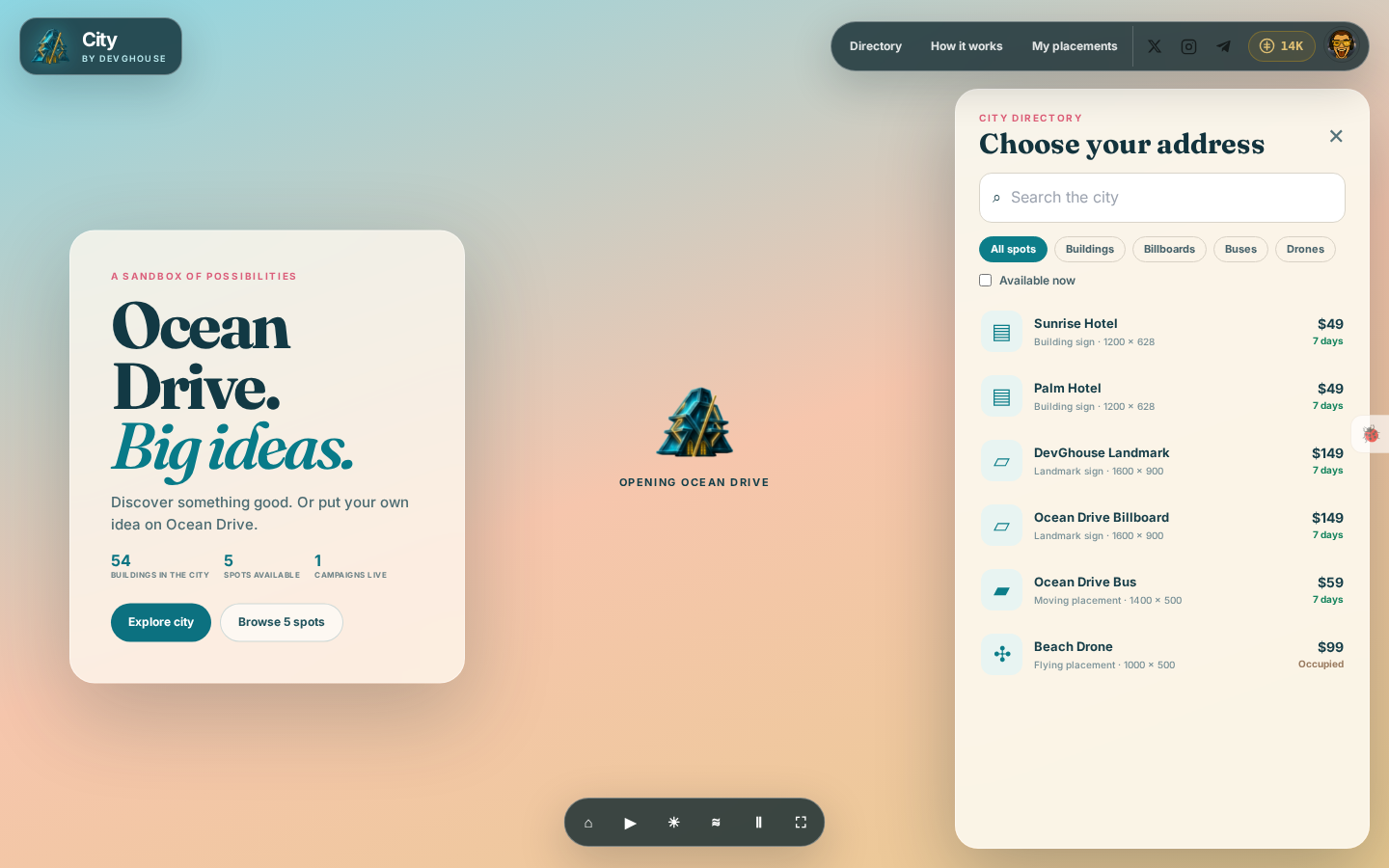
Every row shows:
- What it is: a building sign, a landmark sign (the two billboards), a moving placement (the bus), or a flying placement (the drone).
- Size: the exact image size that spot needs, in pixels.
- Price and length: every spot currently rents for seven days at a fixed price.
- Availability: a free spot shows its price in green; a taken one is marked Occupied and cannot be selected until its current seven days run out.
Search and filter
- Type in Search the city to find a spot by name.
- Use the All spots / Buildings / Billboards / Buses / Drones tabs to narrow the list to one type.
- Tick Available now to hide anything currently occupied.
Open a spot
Click any row to open it. If someone's idea is already live there, you see it exactly as visitors do, including a link to visit it yourself. If it is free, you land straight on the form described in Placing your idea.
Prices, as of this writing: a building sign is 4,900 credits ($49), the bus is 5,900 credits ($59), the drone is 9,900 credits ($99), and each of the two landmark billboards is 14,900 credits ($149). All of them are seven-day terms.