
Engagement and leads
Engagement watches for handles and keywords you care about, then drafts a reply in your voice and puts it in a queue for you to approve, edit or reject. Nothing goes out under your name without a person or an automation you've explicitly trusted approving it first.
Today, the full Engagement dashboard, the one where you build a Watch Rule, review drafts and check performance, lives under Twitter/X. Instagram and Threads each get a simpler, read-only Insights page instead. See Instagram and Threads: Insights below.
X: Watch Rules and the review queue
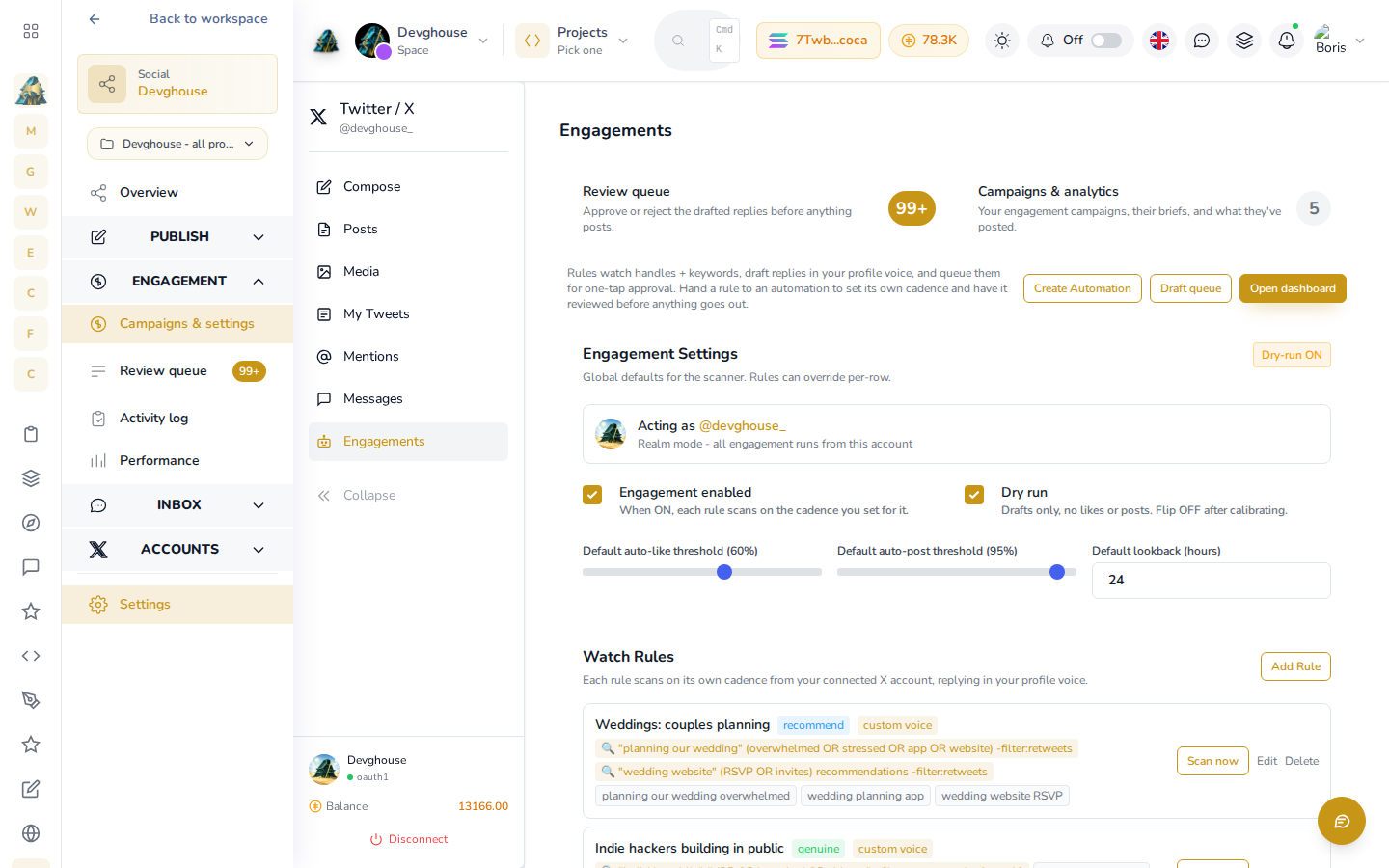
Open Engagement > Campaigns & settings under Twitter/X in the Social sidebar. Here it is running for the DevGhouse account, with five real Watch Rules already live, Dry run on, and a Review queue with real drafts waiting:
How it's laid out
- Review queue counts drafts waiting for your decision.
- Campaigns & analytics counts your rules and what they've posted.
- Engagement Settings are the defaults every rule uses unless a rule overrides them: whether engagement is on at all, Dry run (drafts only, nothing is liked or posted, recommended until you trust what it produces), an auto-like threshold, an auto-post threshold, and how far back it looks for things to react to.
- Watch Rules lists each rule you've set up, or invites you to add one if you haven't yet.
Engagement starts with Engagement enabled off and Dry run on. Both have to be changed before anything posts on its own; leaving Dry run on gives you drafts to review with zero risk of an unapproved reply going out.
Create a rule
- Click Add Rule. Here's a real rule being set up for DevGhouse itself, watching its own handle and brand keywords, with a reply voice written for the DevGhouse team:
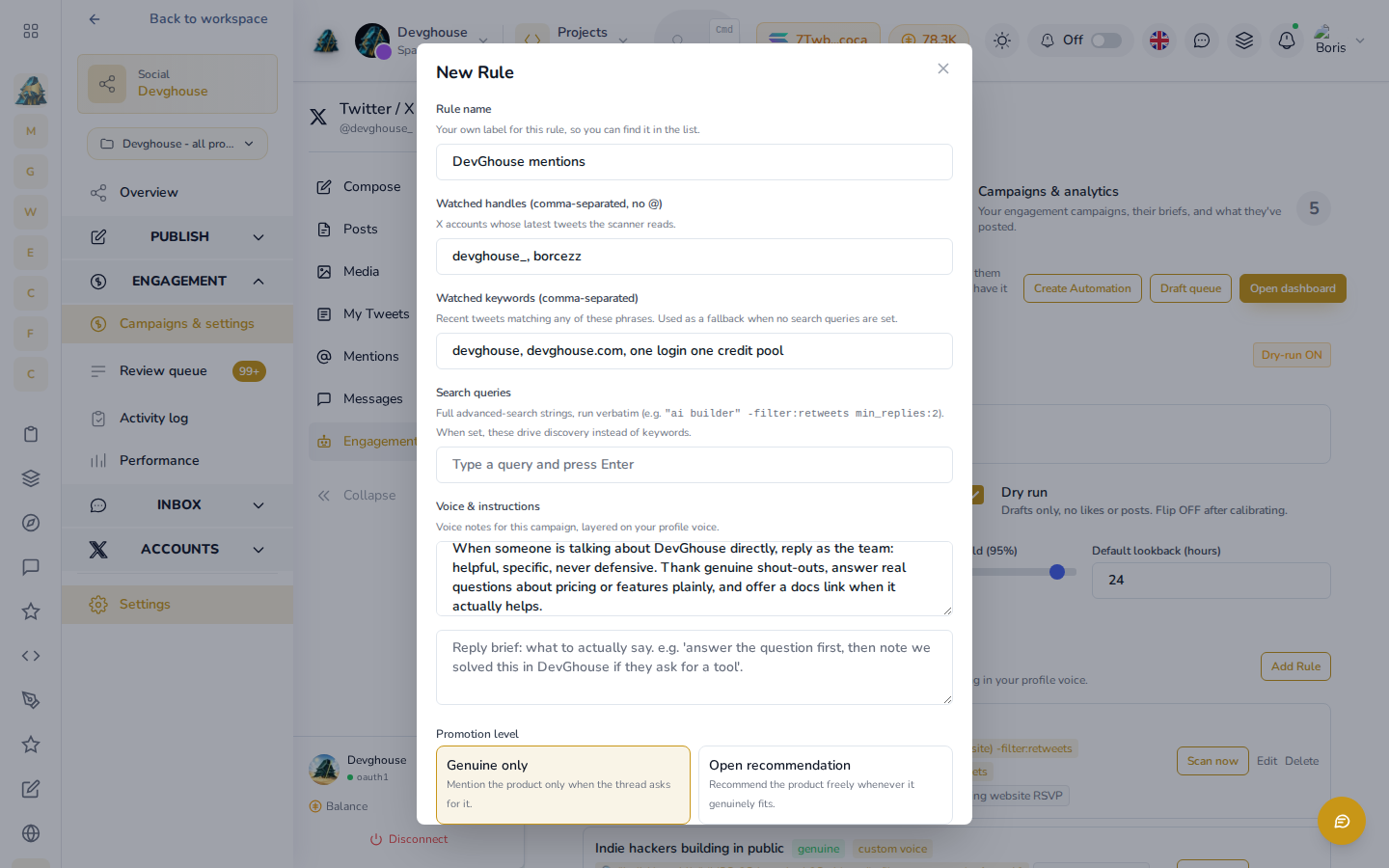
- Give it a name you'll recognize later, for example the campaign or the product it's watching for.
- Add watched handles (accounts to read), watched keywords (phrases to match), or a full search query if you need something more specific than either.
- Optionally add voice notes and a reply brief, so replies sound like you and say what you actually want said.
- Choose a promotion level: Genuine only mentions your product just when the conversation already asks for it, Open recommendation brings it up whenever it fits.
- Save. The rule starts due, so the next scan picks it up.
Approve what it drafts
Click Review queue to see what's waiting. DevGhouse's own rules keep a running backlog, each card carrying the source tweet, a drafted reply already written in the account's voice, and a relevance score:
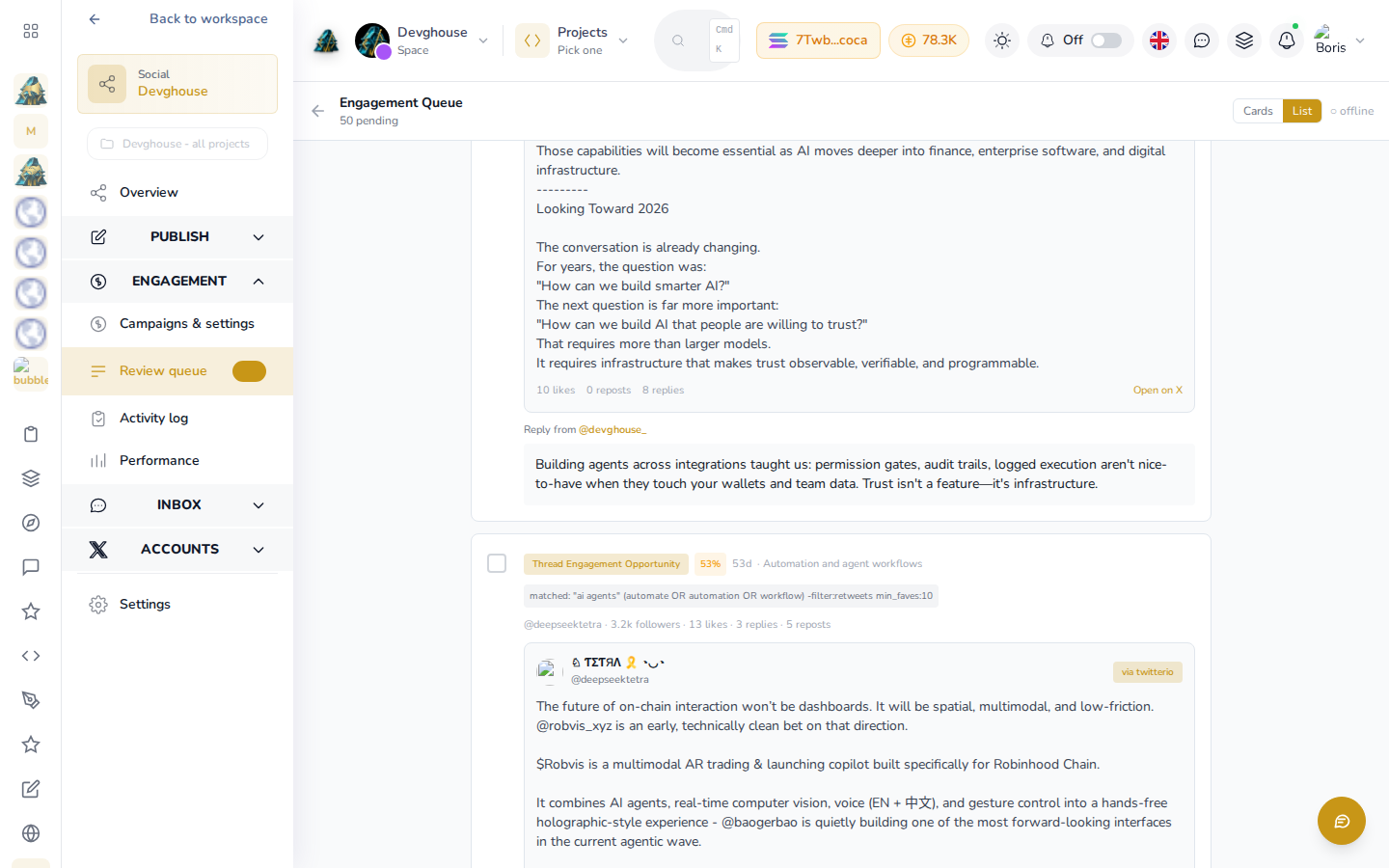
When a rule finds something, it appears here as a card: read it, then approve it as written, edit the text and approve that instead, or reject it with a reason. Nothing posts until you approve it, unless you've turned off Dry run and raised the auto-post threshold high enough that the platform is confident enough to skip the review step for that one reply.
Activity log and performance
Activity log lists every like, reply, post and repost the platform has actually performed, whether it came from a rule, a routine, or you doing it manually, filterable by action, source and date. It only fills in once something has actually gone out; with Dry run on, DevGhouse's own drafts stay in the Review queue above until a person approves them, so this log starts empty for a new rule and stays that way until Dry run is turned off or you start approving by hand.
Performance rolls the same data into totals: engagements this week, likes given, replies posted, and reach where the network reports it. Use this if you're tracking growth against a goal, or reporting results to a client.
Instagram and Threads: Insights
Instagram and Threads don't have a Watch Rules builder or a review queue in the interface yet. Each network has its own Insights link instead (open Instagram or Threads under Accounts, then click Insights), showing a read-only log: every comment reply an automation has already sent, and how your recent posts are performing. There's no Add Rule button here.
If you want Instagram or Threads engagement running, it has to be set up by an AI assistant or a routine, the same tools described below with provider: "instagram" or provider: "threads". Once a rule exists, its activity shows up on the network's own Insights page.
Run it with an AI assistant
A connected assistant or routine can run the whole pipeline, on any of the three networks: social_engagement_rule_create and social_engagement_rule_update to set up or adjust a rule (pass provider: "twitter", "instagram" or "threads"), social_engagement_rule_scan to run one right now instead of waiting for its schedule, and social_engagement_draft_list, social_engagement_draft_approve and social_engagement_draft_reject to work the review queue the same way you would by hand. twitter_engagement_summary and twitter_engagement_logs (the same tools cover Instagram and Threads with a provider argument) pull the numbers behind Performance and Activity log for a report. For X specifically, a rule only ever scans when something calls social_engagement_rule_scan, so its cadence belongs to whatever routine you attach it to.