
Connect an AI assistant
Everything in this guide is also available to an AI assistant connected to your DevGhouse workspace, whether that's an interactive assistant you talk to (Claude, Codex, Cursor, or any MCP client) or a routine that runs on its own schedule.
Connect an interactive assistant
- In your workspace, open Integrations > MCP and copy your personal MCP connection details (or generate a token scoped to one coin from that coin's Agents tab under My coins, if you want an assistant to only ever touch that one coin).
- Add that connection to Claude, Codex, Cursor, or whichever MCP-compatible tool you use.
- Ask it to do something concrete: draft a coin, check a launch gate, look up the leaderboard, or check your positions. It uses the same
launchpadtools listed on the Crypto overview, gated to whatever your account can already do.
Anything that spends credits, mints a coin, opens a trade, or sends funds always comes back to you for approval first; a well-behaved assistant reads your wallet balance and confirms the exact chain, amount and action with you before it acts.
Ready-made routines ("AI helpers")
If you don't want to prompt an assistant yourself, Crypto ships routines you can turn on instead: automations that run on a schedule or a webhook and post the result back to you.
- Click AI helpers in the top navigation, or go to
/automation. - Pick a routine. There are four built in, covering coin launches, KOL engagement, and prediction-market betting. Each card shows exactly what it needs and its real cost per run, for example:
- Launch a meme coin: give it a name, ticker and theme; it generates the art and mints from your own platform wallet. Roughly 111 to 130 credits per run.
- Launch a meme coin from the news: scans breaking crypto stories and only launches when something genuinely qualifies. Most runs launch nothing, and cost nothing beyond the news scan itself.
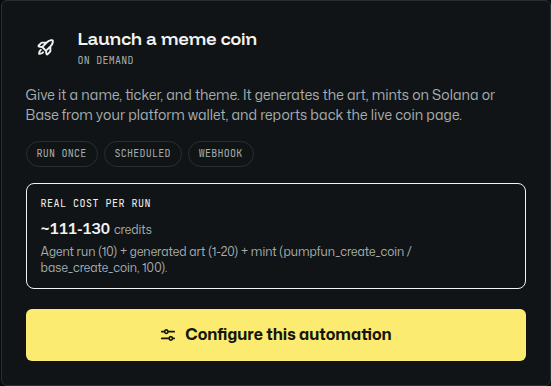
- Click Configure this automation and it opens the routine builder in your workspace, with the coin's name, ticker and theme ready for you to fill in, alongside the chain, the trigger and a schedule:
- Set how it should trigger (run once, on a schedule, or by webhook), and click Save automation.
Every routine spends your own credits and trades from your own platform wallet, exactly like doing it yourself through the app.