
Trading
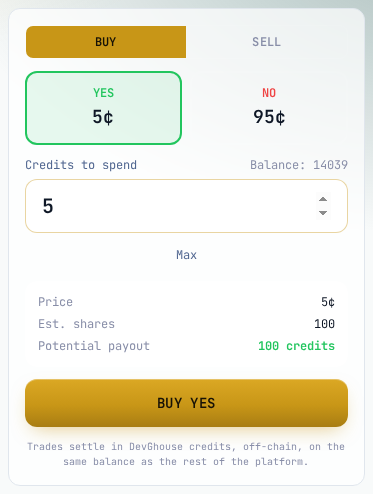
Every open market has a trade panel on its own page, next to its rules and price chart. You need to be signed in to use it; a signed-out visitor sees Sign in to trade in place of the buy button.
How prices work
A market has a Yes price and a No price, in cents, that always add up to 100. A Yes price of 5 cents means the board is pricing that outcome at roughly a 5% chance; buying it pays out 100 credits per share if it resolves Yes. Every trade shifts the price a little: buying Yes pushes the Yes price up, buying No pushes it back down, and so on.
Buy shares
- Open a market and choose Buy (selected by default).
- Click Yes or No for the side you want.
- Type an amount into Credits to spend, or use the +10 / +25 / +50 shortcuts or Max to spend your whole balance.
- Check the summary: Price, Est. shares, and Potential payout if that side wins.
- Click Buy Yes or Buy No.
If you try to spend more credits than you have, a red warning appears above the button reading Not enough credits for this trade, with a Top up credits link, and the buy button itself is disabled; you cannot submit until you either lower the amount or add credits.
Sell shares
- Switch the panel to Sell.
- Choose the side you already hold; You own shows how many shares of that side you have in this market.
- Type how many shares to sell, or click Sell all.
- Click Sell Yes or Sell No.
You can only sell shares you actually hold; the field is capped at what You own shows.
Recent trades
The card under the trade panel lists the market's most recent trades, buy or sell, side, size, price, and how long ago, so you can see how active a market has been before you commit.
Setting an automatic exit
Every position can carry a take-profit and a stop-loss, a price level on its own side that automatically sells the position for you once it is crossed, so you do not have to watch the market. The guided web panel does not expose this directly; it is set through an AI assistant with prediction_trade at the time you buy, or prediction_set_exits afterward on a position you already hold, and it is also how a deployed trading agent protects every position it opens.
Once you have an open position, track it from your portfolio.