
Deploy a trading agent
A trading agent is an autonomous routine that scans open markets on a schedule and places bets for you within limits you set up front, take-profit and stop-loss included. You do not need to know anything about the platform's automation system to set one up; the guided form covers everything.
Set one up
Click Deploy trading agent, next to the heading on your Portfolio page.
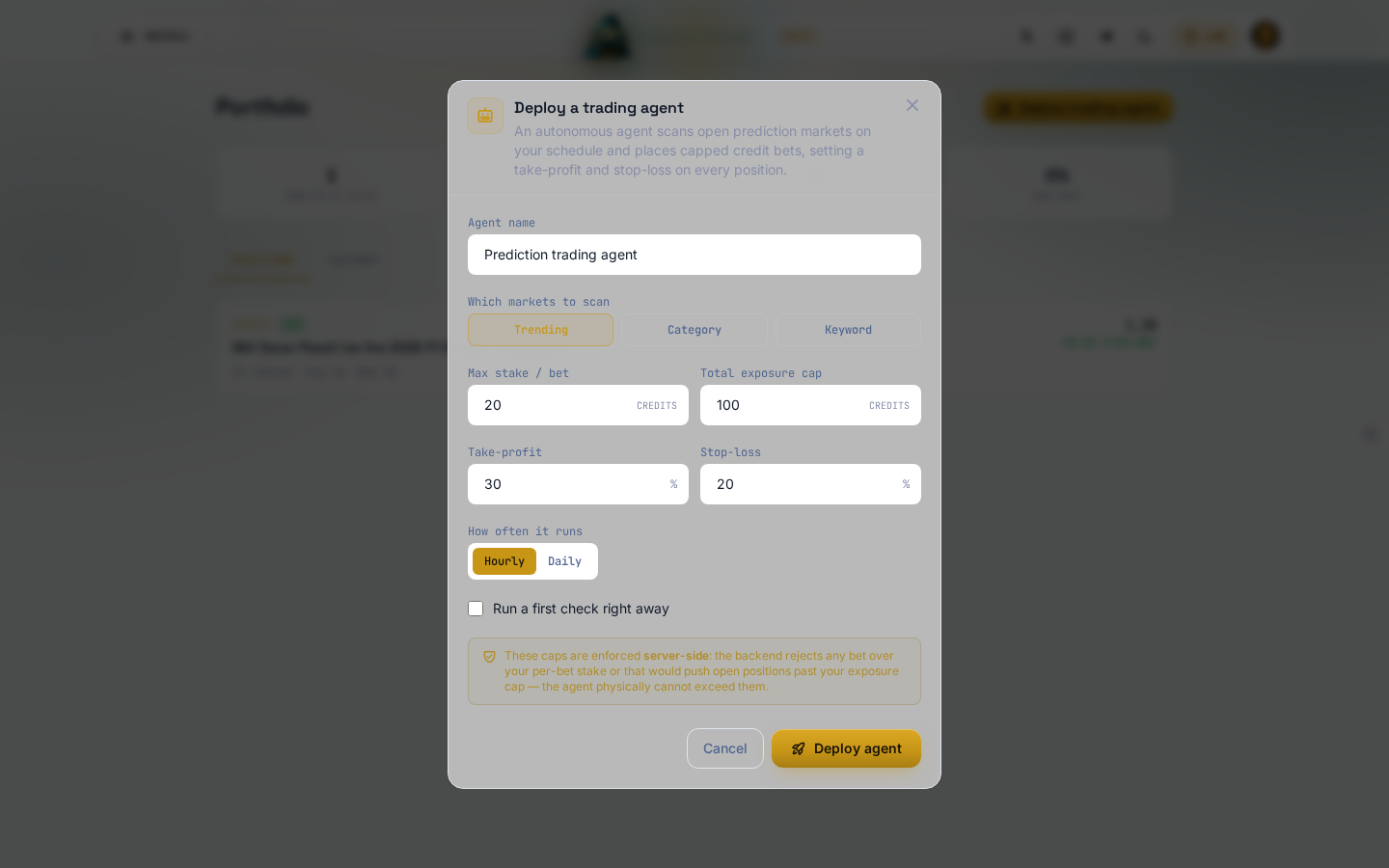
- Give it an Agent name.
- Choose Which markets to scan: Trending (the busiest markets right now), Category (pick one), or Keyword (matches markets whose title or description contains it, such as "election" or "halving").
- Set Max stake / bet, the most it can put into any single position, and Total exposure cap, the most it can have open across every position at once.
- Set Take-profit and Stop-loss percentages; every position the agent opens gets both automatically.
- Choose How often it runs: Hourly, or Daily at a time you pick.
- Tick Run a first check right away if you want an immediate result instead of waiting for the next scheduled run.
- Click Deploy agent.
Your stake and exposure caps are enforced on the server, not just in this form; the agent physically cannot place a bet that would break either limit, whatever it decides on its own.
What it does after that
Once deployed, the agent runs on the schedule you set, reads the markets your filter matches, and places bets within your caps, each with the take-profit and stop-loss you set attached. Positions it opens show up in your Portfolio exactly like a position you opened by hand, and it stops opening new ones the moment your total exposure cap is reached.
Each successful run costs the same flat AI research fee as any other agent run on the platform, 1 credit on your own Claude, Codex, or Kimi account, or real provider cost times 1.5 on the DevGhouse Proxy, whether or not it ends up placing a bet that time. A failed run costs nothing. Any bet it places is a separate spend, from the same credit balance, capped at what you set in Max stake / bet and Total exposure cap.